Agent payment links

Stop chasing agents for premium by email, phone and check. Send each agency a secure link where it sees what it owes, pays one invoice, several invoices or part of one by card or ACH, and gets a receipt in your name.

Insurance organizations collecting premium with CoverPay
  • First Insurance
  • ASIA, An ANV Company

Why agency bill collection stalls

On agency bill business the retail agent owes you the premium. Statements go out, then your team follows up one agency at a time, matches checks to invoices and keys receipts into the policy system.

A payment link removes the back and forth. The agent opens one page, sees the open invoices for its account and pays. You see the payment against the right invoices as soon as it is made.

You send the link from CoverPay, or your policy or billing system creates it through the CoverPay API. The link is encrypted, scoped to that agency account and expires.

The agent chooses what to pay, sees the premium and the payment fee as separate amounts, and pays by card or bank account. The receipt carries your company name and payer-support contact.
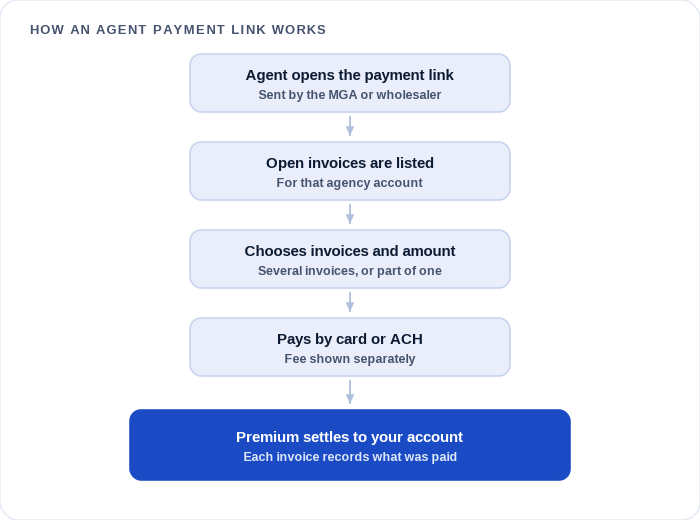
The agent opens the payment link, sees the open invoices for the account, chooses one or several invoices or part of one, and pays by card or ACH with the fee shown separately. The premium settles to your account and each invoice records what was paid against it.

What the agent can do

Everything happens on one branded page. The agent needs no CoverPay subscription or separate payment setup.

Pay several invoices at once. One payment covers every invoice the agent selects, and each invoice records what was paid against it.
Pay part of an invoice. A partial payment is allocated to that invoice and the balance stays open.
Pay by card or ACH. Card fees are configurable from 3.5% to 3.9%; ACH is a flat $3 per payment (how fees work).
Pass an invoice to the insured. Where your system allows it, the agent can request payment from the insured instead of paying.
Get a receipt. The receipt names your company, so payment questions reach your team.

Controls for your team

The link follows your rules, so finance can trust what arrives.

No double payment. While an invoice is being paid it cannot be paid again.
Scoped and expiring. A link shows only that agency account, and an expired or cancelled link is refused with a clear message.
ACH shown as Processing until the bank settles it (ACH premium payments).
Optional ACH fee sponsorship. An MGA can pay its agents' ACH fees for them.
Failed payments listed with the reason the bank or card gave (failed payment follow-up).

Where the money goes

An agent payment follows the same path as every CoverPay payment.

Premium settles to the account you choose, including a premium trust account
CoverPay's fee is recorded separately and never taken out of premium
Each payment appears in your settlement statement and payout view
The result can be posted back to your policy or accounting system through the CoverPay integrations, for example Expert Insured

Questions

See an agent payment link in a demo

Tell us how your agents pay today and which system issues your invoices. We will walk you through the agent experience.

A walkthrough built around your payment workflow
Works with the systems you already run
Reply within one business day

We reply within one business day. Prefer email? sales@coverpay.ai